Software
maws
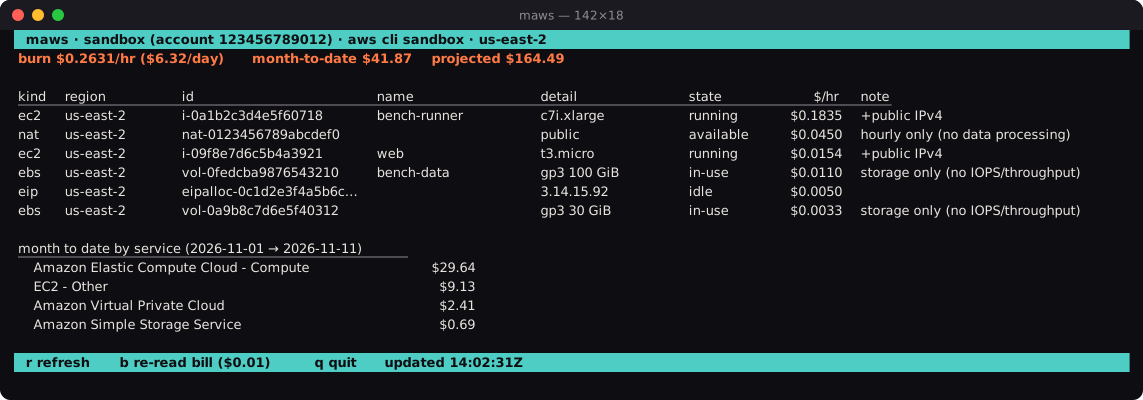
The resources in an AWS account, their cost per hour and the bill so far this month, shown in one terminal screen. Written in Mojo.
What it shows
- $/hr for every running EC2 instance, EBS volume, NAT gateway and public IPv4 address, at the on-demand list price from the AWS Pricing API.
- Month-to-date from Cost Explorer, by service, cached for an hour, since every call is billed at $0.01.
- Projected: month-to-date plus the current burn for the rest of the month.
- The account name and ID, so a $0 for the wrong account is obvious.
How it is built
- No AWS SDK and no C shim: requests are signed with sigv4.mojo, EC2's XML is read with xml.mojo, and libcurl is called directly from Mojo.
-
Credentials from the environment,
~/.aws/credentials, or the AWS CLI foraws login, SSO and role profiles. - A Python reference (boto3 + Textual) in the same repository, held to the same numbers.
Install
On macOS arm64 or Linux x64, use the install script. Read it first: it downloads
the latest release, checks its SHA-256 against the published checksum, unpacks it to
~/.local/share/maws and links ~/.local/bin/maws. No sudo.
curl -fsSL https://raw.githubusercontent.com/magmalake/maws/main/install.sh | lessOnce you have read it:
curl -fsSL https://raw.githubusercontent.com/magmalake/maws/main/install.sh | bash
Then run maws, or maws --profile <name> for another
AWS profile.
Or download a tarball and its .sha256 from the
releases page yourself.